Select Emojis From A Push-Button Pop-Up Menu
This script will display a pop-up menu on your screen that looks like this:
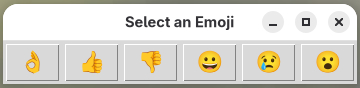
When you click a button, the emoji on that button will be sent to the active desktop window, via the keyboard, and the pop-up will close.
This script demonstrates the use of Python libraries that are not part of AutoKey. In this case that’s the Python tkinter GUI-building package. If you use this script you may need to install the tkinter package on your system. On Debian-based systems that package is called “python3-tk.” On Fedora it is “python3-tkinter.”
# This script demonstrates the use of the Python tkinter toolkit
# to display a pop-up window containing a set of buttons which
# send the Unicode character for the emoji depicted on the
# button through the keyboard.
#
# tkinter is not thread safe so we will run it in a separate
# thread so that it does not crash AutoKey itself.

# The emojis to be displayed
emoji_list = ('👌', '👍', '👎', '😀', '😢', '😮')

import tkinter as tk
from tkinter import font
import os
import threading

#  Enable this script to write messages in the Autokey log,
#  ~/.local/share/autokey/autokey.log
logger = __import__("autokey.logger").logger.get_logger(__name__ + ".emoji.script")

#  This function contains the code that will be run in the separate thread
def emoji_menu():

        #  button_clicked() is what gets called when a button is clicked.
        #  It closes the pop-up menu and then outputs the emoji as a
        #  Unicode character sent via the keyboard.
        def button_clicked(character):
                root.destroy()
                if os.environ['XDG_SESSION_TYPE'] == 'wayland':
                   escape_code = character.encode('unicode_escape').decode('utf-8').lstrip('\\U0')
                   keyboard.send_keys(f'<ctrl>+<shift>+u{escape_code} ')
                   time.sleep(0.3)
                else:
                   keyboard.send_keys(character)

        #  Establish popup window
        root = tk.Tk()
        root.title('Select an Emoji')

        #  After you have run this script, search the ~/.local/share/autokey/autokey.log
        #  for lines containing "emoji.script".  One of those lines will be a message
        #  telling you which font the script has found to use to display the emoji
        #  characters.  Putting that name here will dramatically speed up the script by
        #  avoiding the font search step below.
        emoji_font = ''

        #  Search for an acceptable font for display of the emoji unicode characters.
        #  The fonts in the "acceptable_fonts_list" are the fonts used by the
        #  CSS of the Unicode Consortium's web page to display these characters.
        #  We look for the first of those fonts that is installed on this system.
        if emoji_font == '':
                acceptable_fonts_list = ('Noto Color Emoji', 'Apple Color Emoji', 'Segoe UI Emoji', 'Times', 'Symbola', 'Aegyptus', 'Code2000', 'Code2001', 'Code2002', 'Musica', 'serif')
                available_fonts_list = list(font.families())
                for f in acceptable_fonts_list:
                        if f in available_fonts_list:
                                emoji_font = f
                                break
                if emoji_font == '':
                        logger.critical('Unable to find an acceptable font on this system to display unicode emoji characters in the buttons of the popup window')
                        logger.critical('None of these fonts are available on this system: {}'.format(acceptable_fonts_list.join(', ')))
                        logger.critical('These are the fonts that are available on this system: {}'.format(available_fonts_list.join(', ')))
                else:
                        logger.info('Using the "{}" font to display the emoji characters in the buttons of the popup window'.format(emoji_font))

        #  Create a GUI frame containing the emoji icons
        frame = tk.Frame(root)
        frame.pack()
        for emoji in emoji_list:
                button = tk.Button(frame,
                        text=emoji,
                        command=lambda x=emoji: button_clicked(x),
                        font=(emoji_font, 16)
                )
                button.pack(side='left', padx=2, pady=2)

        #  Place the pop-up window on the screen, centered on the mouse pointer
        root.update_idletasks()
        w = root.winfo_width()
        h = root.winfo_height()
        (x,y) = mouse.get_location()
        x = x - (w // 2)
        y = y - (h // 2)
        if x < 0:
                x = 0
        if x + w + 10 > root.winfo_screenwidth():
                x = root.winfo_screenwidth() - w - 10
        if y < 0:
                y = 0
        if y + h + 30 > root.winfo_screenheight():
                y = root.winfo_screenheight() - h - 30
        root.geometry(f'{w}x{h}+{x}+{y}')

        #  Pop up the pop-up window
        root.mainloop()

#  Run the emoji_menu() function in a separate thread to prevent AutoKey
#  from crashing
thread = threading.Thread(target=emoji_menu)
thread.start()
thread.join()